1047 字
5 分钟
给 giscus 评论添加一个优雅的飞书评论通知
最后更新于 ,距今已过 5 天
部分内容可能已过时
AI 摘要
本文介绍用飞书自定义机器人接管 giscus 评论通知:在飞书群获取 Webhook,存入 GitHub 仓库 Secret,再通过 GitHub Actions 监听 Discussion 评论并推送飞书卡片;另提供一个同时通知 Issues 友链申请与回复的版本。
由 AI 生成,仅供参考,请以正文为准
前言
不知道你是不是跟我一样觉得 giscus 的评论通知有点不太优雅,这玩意走的是 GitHub 的默认邮箱通知,如果你跟我一样 GitHub 绑的是 Gmail 那恭喜你享福了,Gmail 在墙内就是不太能及时看到的存在,哪怕我用的是 iPhone 只要不开梯子掉通知都是家常便饭的事
如果你也有跟我一样的烦恼,那不妨用飞书机器人去接管评论通知,卡片式通知我是感觉比 GitHub 默认的通知直观多了,而且在墙内可以实现秒收,操作也是非常简单有手就行
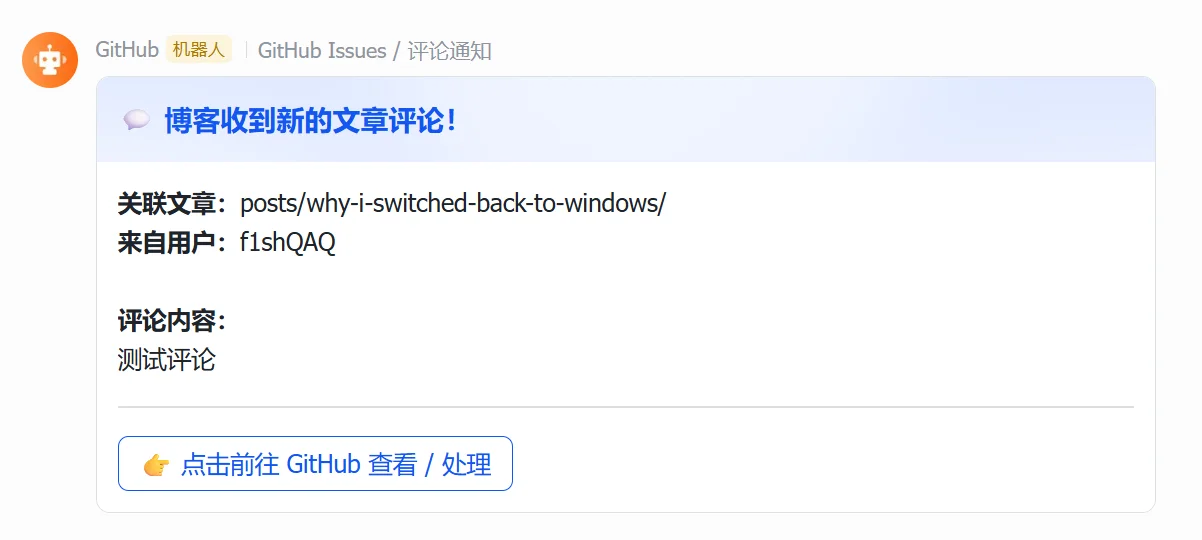
部署步骤
- 在飞书创建一个群,添加群机器人,选择自定义机器人,添加之后复制 Webhook 地址
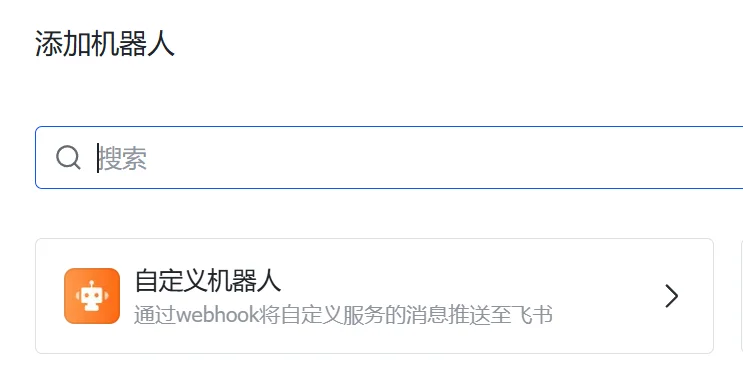
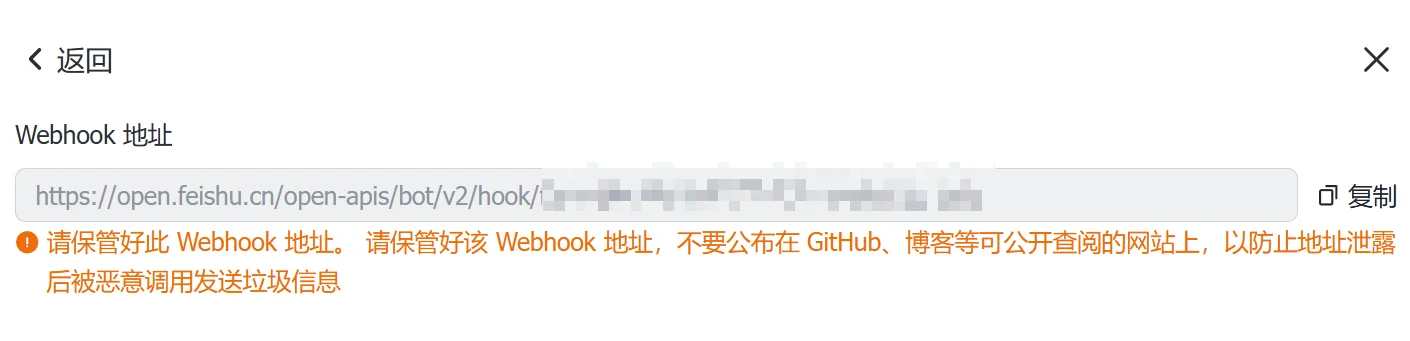
- GitHub 找到你部署 giscus 的仓库,点击
Settings -> Secrets and variables -> Actions -> New repository secret,Name 设置为FEISHU_WEBHOOK,Secret 设置你刚刚复制的 Webhook 地址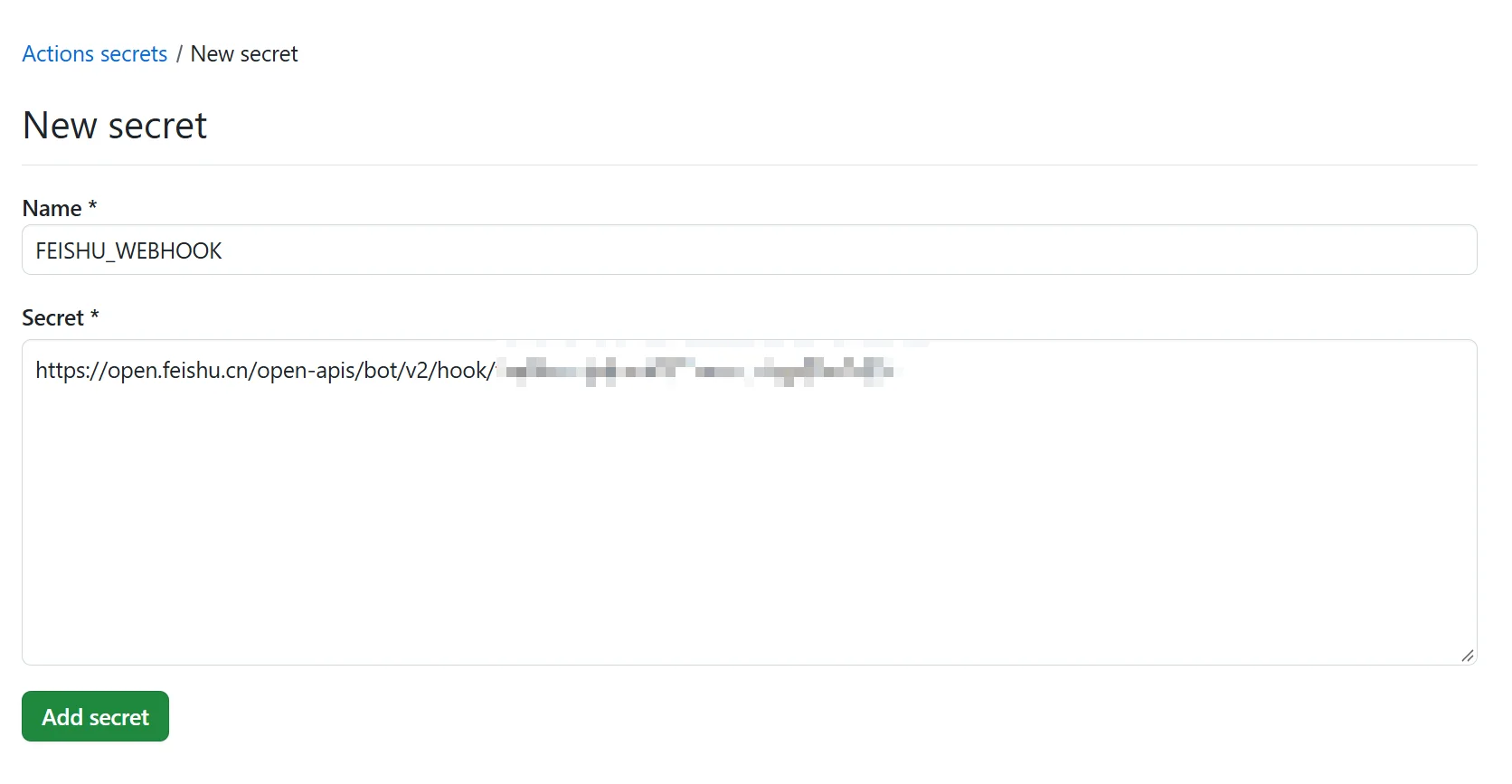
- 在仓库中创建文件,文件名直接输入
.github/workflows/feishu_notify.yml,然后输入以下内容,提交,等几秒就生效了
name: 飞书 Discussion 评论通知
on: # 只监听 Discussion 下的评论及回复 discussion_comment: types: [created]
jobs: send-to-feishu: runs-on: ubuntu-latest steps: - name: 解析评论并推送飞书卡片 env: FEISHU_WEBHOOK: ${{ secrets.FEISHU_WEBHOOK }} SENDER: ${{ github.event.sender.login }} TITLE: ${{ github.event.discussion.title }} BODY: ${{ github.event.comment.body }} URL: ${{ github.event.comment.html_url }} # 有 parent_id 说明是楼中楼回复 PARENT_ID: ${{ github.event.comment.parent_id }} run: | if [ -n "$PARENT_ID" ]; then HEADER_TITLE="↩️ 评论区有人回复了" COLOR="wathet" else HEADER_TITLE="💬 博客收到新的文章评论!" COLOR="blue" fi
# 使用 jq 安全组装 JSON(防止换行符、引号导致发送失败) PAYLOAD=$(jq -n \ --arg header "$HEADER_TITLE" \ --arg color "$COLOR" \ --arg title "$TITLE" \ --arg sender "$SENDER" \ --arg body "$BODY" \ --arg url "$URL" \ '{ msg_type: "interactive", card: { header: { title: { tag: "plain_text", content: $header }, template: $color }, elements: [ { tag: "div", text: { tag: "lark_md", content: ("**关联文章:**" + $title + "\n**来自用户:**" + $sender + "\n\n**评论内容:**\n" + $body) } }, { tag: "hr" }, { tag: "action", actions: [ { tag: "button", text: { tag: "plain_text", content: "👉 点击前往 GitHub 查看 / 回复" }, type: "primary", url: $url } ] } ] } }')
curl -s -X POST -H "Content-Type: application/json" -d "$PAYLOAD" "$FEISHU_WEBHOOK"以上版本只通知 Discussion 的变动,如果你跟我一样在 Issues 设置了友链申请,希望友链申请也能通知,可以用以下这个版本
name: 飞书互动通知
on: # 1. 友链申请(新建 Issue 或申请人修改了 Issue) issues: types: [opened, edited] # 2. 友链申请下的留言互动 issue_comment: types: [created] # 3. 博客文章评论及楼中楼回复(只监听评论,避免 giscus 建帖时重复推送) discussion_comment: types: [created]
jobs: send-to-feishu: # 排除 PR 下的评论(issue_comment 也会被 PR 评论触发) if: github.event_name != 'issue_comment' || !github.event.issue.pull_request runs-on: ubuntu-latest steps: - name: 解析事件并推送飞书卡片 env: FEISHU_WEBHOOK: ${{ secrets.FEISHU_WEBHOOK }} EVENT_NAME: ${{ github.event_name }} ACTION: ${{ github.event.action }} SENDER: ${{ github.event.sender.login }} # 自动识别是 Issue 还是 Discussion TITLE: ${{ github.event.issue.title || github.event.discussion.title }} # 评论事件取评论内容,Issue 事件取 Issue 正文 BODY: ${{ github.event.comment.body || github.event.issue.body }} URL: ${{ github.event.comment.html_url || github.event.issue.html_url }} # Discussion 评论有 parent_id 说明是楼中楼回复 PARENT_ID: ${{ github.event.comment.parent_id }} run: | case "$EVENT_NAME" in issues) TOPIC_LABEL="友链申请" BODY_LABEL="申请内容" if [ "$ACTION" = "edited" ]; then HEADER_TITLE="🔄 友链申请信息已更新" COLOR="orange" else HEADER_TITLE="🤝 收到新的友链申请!" COLOR="purple" fi ;; issue_comment) TOPIC_LABEL="友链申请" BODY_LABEL="回复内容" HEADER_TITLE="📨 友链申请有新回复" COLOR="indigo" ;; discussion_comment) TOPIC_LABEL="关联文章" BODY_LABEL="评论内容" if [ -n "$PARENT_ID" ]; then HEADER_TITLE="↩️ 评论区有人回复了" COLOR="wathet" else HEADER_TITLE="💬 博客收到新的文章评论!" COLOR="blue" fi ;; esac
# 使用 jq 安全组装 JSON(防止换行符、引号导致发送失败) PAYLOAD=$(jq -n \ --arg header "$HEADER_TITLE" \ --arg color "$COLOR" \ --arg topic_label "$TOPIC_LABEL" \ --arg body_label "$BODY_LABEL" \ --arg title "$TITLE" \ --arg sender "$SENDER" \ --arg body "$BODY" \ --arg url "$URL" \ '{ msg_type: "interactive", card: { header: { title: { tag: "plain_text", content: $header }, template: $color }, elements: [ { tag: "div", text: { tag: "lark_md", content: ("**" + $topic_label + ":**" + $title + "\n**来自用户:**" + $sender + "\n\n**" + $body_label + ":**\n" + $body) } }, { tag: "hr" }, { tag: "action", actions: [ { tag: "button", text: { tag: "plain_text", content: "👉 点击前往 GitHub 查看 / 处理" }, type: "primary", url: $url } ] } ] } }')
curl -s -X POST -H "Content-Type: application/json" -d "$PAYLOAD" "$FEISHU_WEBHOOK"给 giscus 评论添加一个优雅的飞书评论通知
https://blog.fishqaq.com/posts/giscus-feishu-comment-notifications/分享文章
生成精美分享图或复制链接,与更多人分享本文。
继续阅读
换条路线
从其他文章中稳定抽取
评论